
How Internet Services Distinguish User Location and Language
International websites often display a local language, currency, shipping region, or catalog as soon as the page opens. The service does not know your exact physical position or personal language preference from one reliable signal. It makes an initial estimate by combining network information, browser settings, stored preferences, account details, and sometimes location data that you have explicitly allowed the site to access.
Location and language are separate concepts. A person browsing from Vietnam may prefer English, while a Vietnamese speaker living in Germany may want Vietnamese content with German prices and delivery options. A well-designed service uses automatic detection only as a starting point and allows the user to correct it.
How Do Websites Detect Your Location and Preferred Language?
Websites may combine server-side and browser-side signals. Some are available during the first request, while others become available only after the page loads or the user grants permission.
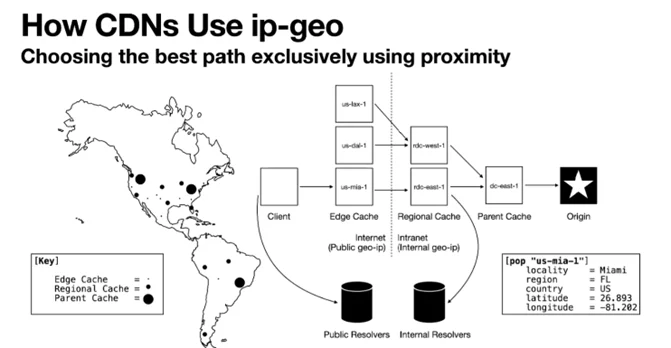
Geographic Location Detection via IP Address (GeoIP)
Every internet request reaches the server from a public IP address. An IP geolocation provider can associate that address with an estimated country, region, city, internet service provider, or network organization.
An IP address is not a precise digital postal address. It normally identifies the network handling the connection rather than the user’s home or exact device location. Mobile networks, corporate gateways, satellite connections, VPNs, proxies, and shared internet infrastructure can make the estimated location differ from the user’s real position.
GeoIP Databases: Services may use databases from providers such as MaxMind or location information added by a content delivery network. These databases map address ranges to approximate geographic areas and are updated as network assignments change.
Level of Accuracy: Accuracy varies by provider, country, network type, and level of detail. MaxMind estimates that its products identify countries with approximately 99.8% accuracy, but its published US estimates are lower for states and cities. It reports roughly 80% accuracy at the state level and about 66% for cities within a 50-kilometer radius. These vendor figures should not be presented as universal performance guarantees.
A returned latitude and longitude may represent an estimated area or network location rather than a building. Developers should use an accuracy radius and fall back to country-level information when more precise data is unavailable.
Practical Application: GeoIP can suggest a country for an initial currency, shipping region, content license, or nearby server. It should not be the only source used to calculate tax, determine a legal residence, or confirm delivery eligibility. Those decisions may require a billing address, shipping address, payment information, or an explicit country selection.
A website can request more precise device location through the browser’s Geolocation API, but this is a separate mechanism. The browser asks the user for permission before sharing location data with the page.
2. Client-Side Browser Language Preference Detection
After a page loads, JavaScript can read language information exposed by the browser.
The navigator.language property normally returns the user’s preferred language, often corresponding to the browser interface language. A result may look like en-US, vi, or ja-JP. It does not reveal the user’s nationality, fluency, or current country.
The navigator.languages property returns an ordered array of preferred languages. A user who has configured Vietnamese first and English second might produce a value similar to:
["vi-VN", "vi", "en-US", "en"]The exact list depends on the browser and its settings. Browsers may also limit the amount of language information they expose to reduce fingerprinting risk.
Developers can use this list to select an initial interface language or format dates and numbers. It should remain a preference hint. Someone may use an English browser on a shared computer but still want the website in another language.
3. Server-Side HTTP Request Language Processing
The server can receive language preferences before the page’s JavaScript runs through the HTTP Accept-Language request header.
A browser may send:
Accept-Language: vi-VN,vi;q=0.9,en-US;q=0.8,en;q=0.7The values are ordered preferences. A language without an explicit quality value has the default value of 1. Lower q values indicate lower preference relative to the alternatives.
In this example, vi-VN is preferred first, followed by general Vietnamese, US English, and general English. The server can compare those preferences with the language versions it has available. BCP 47 defines language-tag structures and matching methods used for this type of language selection.
Accept-Language does not force the server to return the first listed language. The site may not support it, and an explicit account or cookie preference may be more relevant. W3C guidance treats HTTP language negotiation, IP-based selection, and manual user selection as different mechanisms.
Why Forcing Language Based Solely on IP Location Is a Terrible User Experience (UX)
An IP address may suggest where a connection originates, but it does not indicate which language the user understands or wants to use.
Challenges for Travelers and Expatriates: A visitor connecting through a Japanese network may not read Japanese. An automatic redirect becomes a serious obstacle when the language control is difficult to find or the site repeatedly sends the user back to the detected version.
Frustration for Technical Specialists: Users may prefer documentation in a particular language because that version contains familiar terminology, more complete examples, or the original publication. Their location should not override that preference.
Broken Content Sharing (Link Integrity): A shared URL should continue to represent the same product, article, or document. Automatically replacing it with a different regional page can alter prices, stock, specifications, or available content.
Google recommends avoiding automatic redirects between language versions based on what the website assumes the user wants. Such redirects can prevent both users and search engines from reaching every available version. Visible links should allow visitors to choose another language themselves.
A less disruptive pattern is to display a suggestion such as “It looks like you are visiting from Vietnam. View the Vietnamese site?” The original page remains accessible, and the user makes the final choice.

Technical Solutions for Accurate Multi-Regional Web Display
1. Implementing hreflang Language Tags for Search Engines (SEO)
When equivalent pages have separate language or regional URLs, hreflang helps Google understand their relationship and display an appropriate version in search results. It does not control the language shown inside the browser after a visitor opens the site.
<!-- Page for English speakers globally -->
<link rel="alternate" hreflang="en"
      href="https://example.com/en/page" />

<!-- Page specifically for English speakers in the United Kingdom -->
<link rel="alternate" hreflang="en-gb"
      href="https://example.com/uk/page" />

<!-- Page for Vietnamese speakers -->
<link rel="alternate" hreflang="vi"
      href="https://example.com/vi/page" />

<!-- Default fallback page when no language matches -->
<link rel="alternate" hreflang="x-default"
      href="https://example.com/en/page" />
Each localized page should reference itself and the other equivalent versions. The relationships should also be reciprocal. The x-default value can identify a fallback or language-selection page for users who do not match another declared version.
Key Benefit: hreflang helps Google connect localized pages and select a suitable URL by language or region. Missing tags do not automatically create a duplicate-content penalty, and adding them does not guarantee that Google will always show the requested URL.
Google recommends separate URLs for different language versions rather than changing the complete page language on one URL through cookies or browser settings alone.
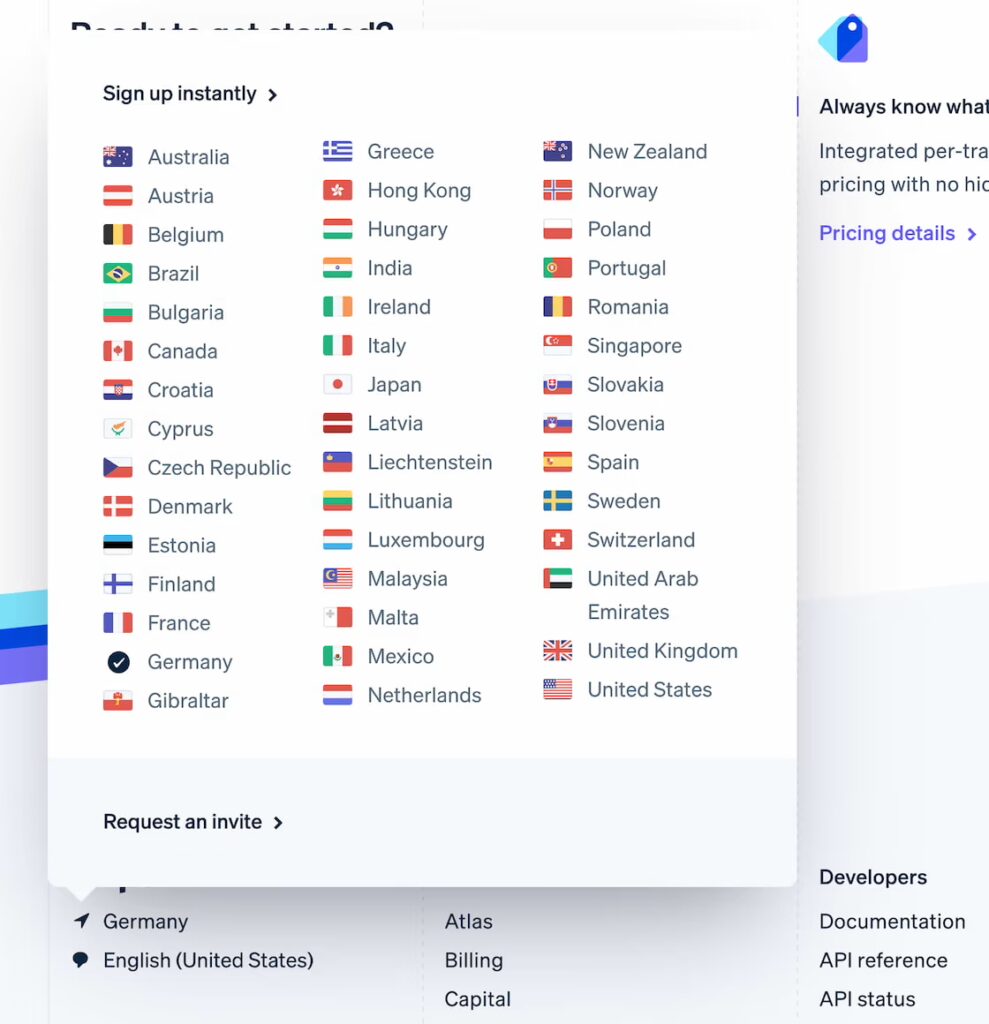
Designing User-Friendly Language Switchers
A language selector allows users to correct an inaccurate automated guess.
Never Use Country Flags to Represent Languages: Flags identify countries, not languages. A language can be spoken in many countries, and one country can have several official or widely used languages. W3C guidance recommends text labels rather than flags for ordinary translation links.
Display recognizable language names such as:
- English
- 日本語
- Français
A selector may show both the native name and a translation when that makes the options easier to understand.
Prominent Placement: Put the selector in a consistent and accessible location, such as the header, navigation menu, or footer. It should remain usable on mobile devices and must not depend solely on recognizing a flag or abbreviation.
Persistence: When a user explicitly selects a language, remember the choice when appropriate and let it override automatic browser or IP guesses. W3C guidance recommends allowing users to change languages easily and offering to remember that selection.
The preference can be stored in an account, cookie, or local browser storage. It should not be treated as permanently irreversible. Users need a visible way to change or reset it, particularly on shared devices.
Managing Language Codes According to International Standards (Language Tags & Codes)
BCP 47 is broader than a simple combination of ISO language and country codes. A tag can include a language, script, region, variant, or extension when those details are needed. The current BCP 47 series consists principally of RFC 5646 for language-tag structure and RFC 4647 for matching.
| Purpose | BCP 47 Standard Tag | Meaning |
|---|---|---|
| General Language | en, vi, ja | English, Vietnamese, Japanese without a regional distinction |
| Language + Region | en-US | English associated with the United States |
| Language + Region | en-GB | English associated with the United Kingdom |
| Language + Script | zh-Hans | Chinese written with the Simplified script |
| Language + Script | zh-Hant | Chinese written with the Traditional script |
Language tags are case-insensitive, although conventional formatting uses lowercase language codes, title-case script codes, and uppercase region codes. A region subtag does not mean the language is spoken only in that country.
Use the shortest tag that accurately describes the content. Do not add a country merely because the server or business is located there.
Internet services estimate location and language through several separate signals. IP geolocation provides an approximate network location. Browser APIs and the Accept-Language header communicate language preferences. Stored settings and account choices can provide stronger information about what the user previously selected. The two concepts should not be merged. Location may influence shipping, currency, catalog availability, and regional notices. Language determines how the interface and content are presented.
A well-designed service uses automatic detection to suggest an initial experience, provides separate crawlable URLs for localized content, implements hreflang where appropriate, and gives users a clear language and region selector. Do not force a permanent language change from an IP address alone. Use browser preferences as an initial hint, preserve the user’s explicit choice, and make every supported version easy to reach.